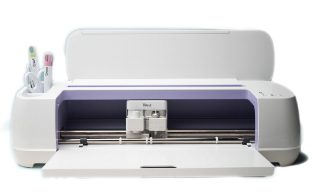
Bring your creative ideas to life with the Cricut Maker. From custom cards and decals to labels, gifts, home décor, and personalized projects, the Cricut can cut hundreds of materials with precision and ease, helping you create something uniquely your own.
Includes:
• Cricut cutting mats (varying grip strengths, 30.48 cm × 30.48 cm (12 × 12 in.) and 30.48 cm × 60.96 cm (12 × 24 in.))
• Cricut tool set (scissors, tweezers, weeder, scraper, and spatula)
How to Use the
Cricut
1. Complete Your Certification
To use this equipment independently, you must complete the required certification online or at your library’s Makerspace.
Online
Complete the Cricut Certification Course on Niche Academy. You will be asked to create a Niche Academy account (requires an email address) to access the course.
Complete the Maker Waiver form and review the Makerspace Guidelines.
3. Book a Maker Station
Reserve Maker Stations through our online booking system, Spaces. You will be asked to create a Spaces account and confirm your email address when making your first booking.
Maker Stations can be booked online up to two days in advance. For next-day or same-day bookings, please contact the library to inquire about availability.
A personal storage device (USB drive) to save your work, or access to your preferred online storage service
Your completed Maker Waiver form
Further Resources
Common Questions
Q: What materials can I use with the Cricut Maker?
A: The Cricut Maker can cut hundreds of materials, making it a versatile tool for everything from paper crafts to home décor projects. Popular materials include:
Paper
Cardstock
Poster board
Fabric
Leather
Vinyl
Felt
Kraft board
Basswood
For a complete list of compatible materials and recommended machine settings, please visit the Cricut Help Center.
Q: Can I use my own device to create and design projects?
A: Yes. You are welcome to use your own laptop or tablet to design projects. Simply download the Cricut Design Space app and sign in using your personal Cricut account.
Learning Resources
Looking for inspiration or help getting started?
Check our events calendar for upcoming Cricut workshops and training sessions.
Independent use of Makerspace equipment requires a completed Makerspace Waiver, a valid library card, photo identification, and compliance with Makerspace policies and guidelines.