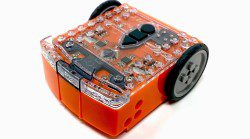
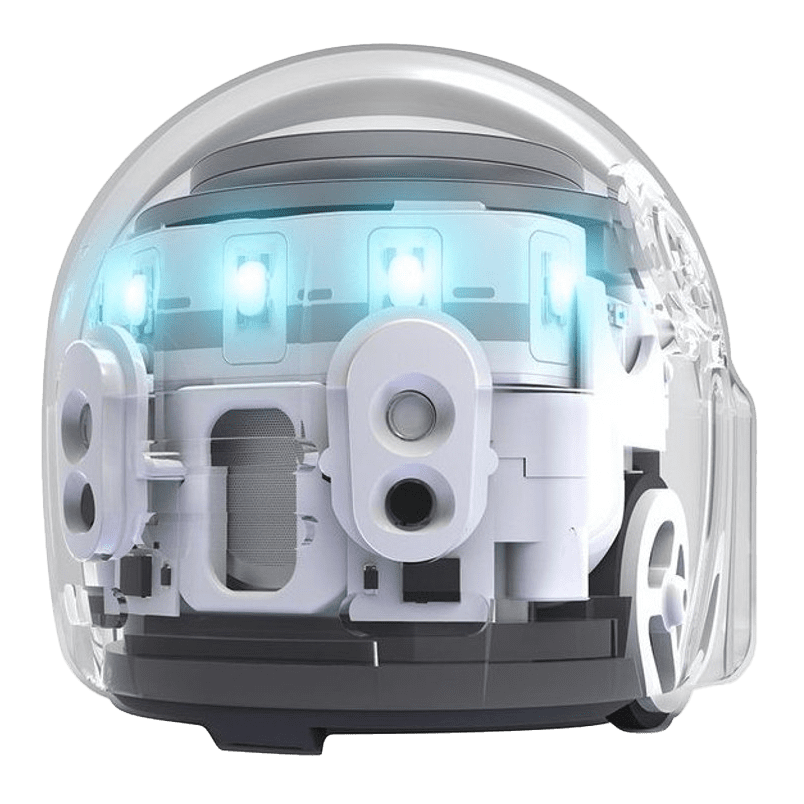
Meet Edison, a small, LEGO-compatible robot designed to help children learn programming concepts in an accessible and engaging way. With built-in sensors and simple programming options, Edison can follow lines, avoid obstacles, respond to light and sound, and even communicate with other Edison robots.
Children can activate pre-loaded programs using barcodes or create their own activities and challenges. Program Edison to dance, make music, navigate a course, or interact with its surroundings while learning the basics of coding and robotics. This kit is a great opportunity for families and children to explore technology and technical problem solving together.
Recommended for ages 4+ with adult assistance.
Getting Started
Begin by inserting fresh batteries into Edison. Use regular disposable alkaline batteries or nickel-metal hydride (NiMH) rechargeable batteries. Avoid using heavy-duty batteries.
To program Edison using barcodes, connect the EdComm cable between the robot and your programming device. Ensure the cable is fully inserted into the device’s audio jack and set the device’s volume to maximum before programming.
Place Edison on a flat surface and scan one of the programming barcodes to activate a function. Edison can follow lines, detect obstacles, respond to light and sound, or interact with other robots. Try different programs and observe how Edison reacts to its environment.
When working with line tracking, start Edison on the white surface rather than the black line. For best results, use dark lines approximately 1.5 centimetres wide on a bright white background. Avoid bright direct sunlight, which can interfere with Edison’s sensors.
Expand, Create, and Invent
Edison works with most LEGO-compatible building bricks. Bricks can be attached to the top and bottom of the robot, and pegs can be attached to the sides. Try building custom vehicles, attachments, or creative designs to expand what Edison can do.
Additional Resources
These resources provide helpful guides, activities, and videos to support learning and experimentation with the Edison Robot Kit.
Getting Started with Edison Guide
A detailed PDF guide with instructions on setting up your device to program Edison, preparing the robot for use, understanding the sensors, buttons, and switches, exploring different programming methods, and troubleshooting common issues.
Edison at Home
Ideas and activities designed for families and learners who want to explore coding and robotics at home. These resources support a wide range of ages and skill levels.
Hour of Code Activities
A collection of short coding challenges designed to be completed in about an hour. Activities vary in difficulty and introduce different programming languages and coding concepts.
Coding with Edison
An overview of the programming languages and tools that can be used to control Edison, helping users progress from simple commands to more advanced coding projects.
Barcode Activities
An introduction to Edison’s offline coding feature. The robot can read printed barcodes to activate different behaviours and actions. This resource includes a printable barcode activity book with guided exercises.

Did you make something awesome using this kit?
Share your creation with us on social media. Remember to use #ORLMakes so everyone can appreciate, learn, and marvel at your invention.

Tell us what you thought!
We want to know all about your experience using this Library of Things kit at home. Please take a few minutes to complete this brief survey.
Lending Policy
- This kit can be borrowed for 2 weeks.
- 1 renewal if no one else is waiting for the item.
- The borrower is responsible for lost, missing, and damaged pieces (see content list with prices included with kit).
- Before returning, please ensure all items are clean and in good condition.
- Return the kit to a staff member at the front desk of your nearest ORL location. Do not use the book drop or leave them outside the library.
- BC One Card patrons: Library of Things kits must be checked out and returned to one of the Okanagan Regional Library branches.