Improving accessibility and comfort at your desk can begin with something as simple as how you type or move a mouse. The ORL’s new Ergonomic Essentials Library of Things kits make it easier to explore tools designed to reduce strain, support natural posture, and create a more comfortable digital experience at home.
We’re excited to introduce two new Ergonomic Essentials kits designed to help you explore more comfortable, supportive ways to work and play on your computer. These kits offer a simple, low-pressure way to try assistive technology at home before deciding what works best for you.
Created with input from the ORL’s Accessibility and Inclusion Advisory Committee, the Ergonomic Essentials kits are built around one idea: access should be practical, approachable, and available to everyone.
Ergonomic Essentials: Keyboard Edition
This kit includes three different keyboard styles designed to support natural posture and reduce strain:
- A wired ergonomic split keyboard that separates the keys into two angled halves, allowing your hands to rest in a more relaxed position.
- A Kensington Ergo wired split keyboard with a gently curved layout and cushioned wrist rest for neutral alignment.
- A high-contrast large print keyboard in yellow and black, featuring oversized lettering to improve visibility and ease of use.
Ergonomic Essentials: Mouse Edition
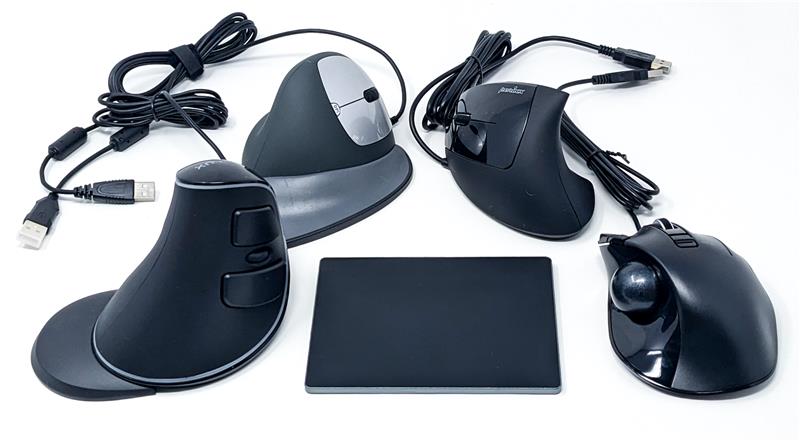
Prefer to change how you navigate instead of how you type? The Mouse Edition lets you explore a range of alternative pointing devices:
- A right-handed vertical mouse with removable palm rest for a natural “handshake” posture.
- A left-handed vertical ergonomic mouse designed for balanced support.
- A semi-vertical mouse that gently tilts your hand while maintaining a familiar feel.
- A trackball mouse that reduces wrist and arm movement.
- A multi-touch trackpad for those who prefer tapping and swiping over gripping.
All devices are plug-and-play using a USB connector. No software installation is required. Simply connect, adjust your setup for comfort, and test each device during your loan period.
Small changes can make a noticeable difference. Relaxing your grip, adjusting pointer speed, or shifting movement from your wrist to your elbow may help reduce strain. And features like large print, high contrast, or ergonomic layouts can benefit many people, whether or not they identify as having a disability. These kits are intended for exploration and learning. If you experience pain, numbness, or discomfort, stop using the device and consult a healthcare professional.
The Ergonomic Essentials kits are part of the ORL’s broader commitment to accessible collections, programs, and services. The ORL offers:
- Print-Disabled Memberships
- Accessible digital collections through the Centre for Equitable Library Access and the National Network for Equitable Library Service
- The ORL’s Digital Collection and Online Resources
- Large print books and audiobooks
- Selection Service and extended loans for eligible patrons
Questions or feedback about accessibility services are always welcome at access@orl.bc.ca.
Need More Help?
Call us at 1-844-649-8127 or email help@orl.bc.ca. Please include as many details as you can about your question, account, or device—this helps us support you more quickly and accurately.
Library card expired? Reach out to your local branch or contact us online to renew—it’s quick and easy.